Definition of Workstreams
In Proggio, workstreams are a way to organize related tasks within a project.
Specifically, they are grouped by functional area, sequence, or objective.
As a result, this structure helps project managers maintain clarity and visibility across complex initiatives.
For instance, a workstream might represent a department such as Marketing, or an ongoing task like Testing or Implementation.
In contrast to traditional Gantt charts, workstreams provide a flexible and dynamic way to plan projects, while at the same time showing how all tasks connect.
Additionally, using workstreams in Proggio allows you to assign ownership, track progress, and manage multiple teams efficiently.
Learn more about Proggio’s Getting Started Features.
Benefits of Using Workstreams
Workstreams provide a structured way to divide your project into clear areas of work.
Consequently, teams can focus on their specific responsibilities while keeping the overall project aligned.
Example 1: Planning for a Wedding

For example, tasks within the Catering & Menu Planning workstream may include:
- Research Catering Options
- Request Catering Proposals
- Schedule Menu Tastings
- Finalize Menu Selection
- Sign Catering Contract
- Plan Bar Service
- Finalize Guest Count and Catering Details
Example 2: Office Relocation

Core workstreams might be IT & Communications and New Office Design.
In addition, each workstream groups related tasks for clarity and accountability.
Example 3: Setting Up a Website
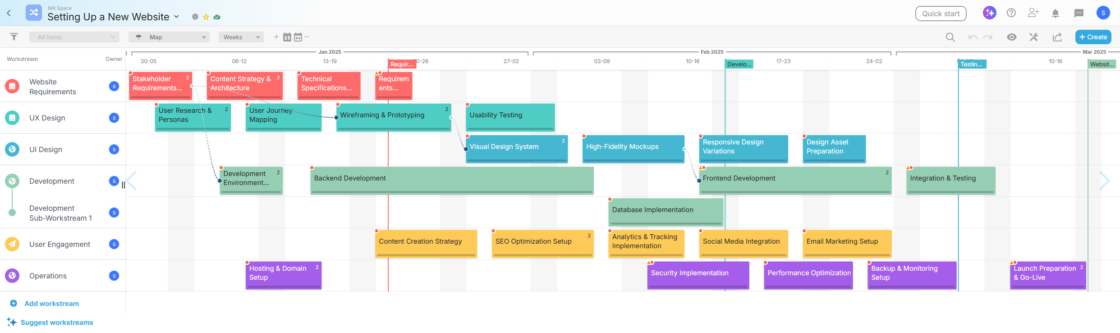
Workstreams can cover Website Requirements, UX, UI, Development, User Engagement, and Operations, allowing teams to work in parallel while maintaining project alignment.
Workstream Ownership and Accountability
Each workstream has an owner, usually a team leader or responsible individual.
Furthermore, assigning an owner ensures accountability for all tasks within that workstream, thereby making collaboration more efficient and reducing ambiguity as the project progresses.
Grouped Workstreams
In addition to individual workstreams, Proggio supports grouped (sub) workstreams.
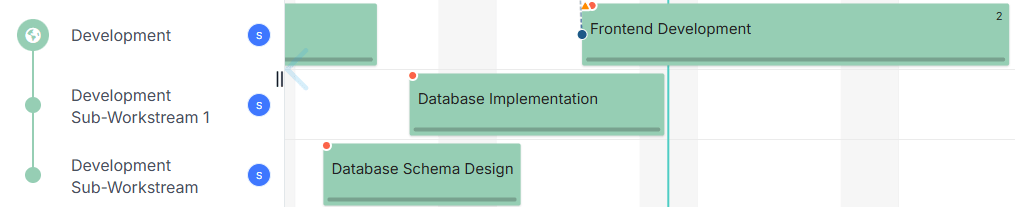
For instance, grouped workstreams are useful when multiple workstreams are related to the same department, process, or phase of work.
You can also use grouped workstreams to split a single department or process into multiple parallel workstreams when work is happening simultaneously.
Therefore, this structure helps maintain clarity while allowing for greater granularity and flexibility in complex projects.
Visual Organization with Dividers
Essentially, dividers are visual elements that separate workstreams into logical sections.
They help distinguish phases, departments, or processes, making large projects easier to read and manage.
Workstream Menu: Additional Features
Access the Workstream menu by hovering over a workstream and clicking the three-dot menu that pops up.
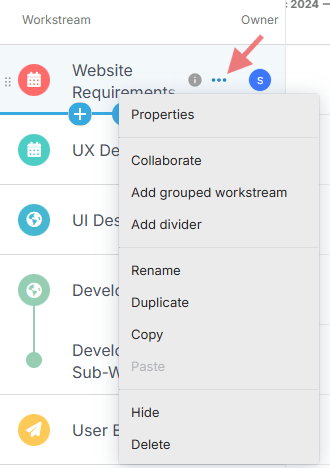
From here, you can manage and customize how each workstream behaves within your project.
Options include:
| Menu Option | Description |
| Properties | Edit title, assign owner, adjust icon and color. |
| Collaborate | Send a message or post to users related to this workstream. |
| Add grouped workstream | Create a sub-workstream under the selected workstream. |
| Add divider | Add a colored divider between workstreams. |
| Rename | Edit the workstream’s name. |
| Duplicate | Duplicate the workstream. |
| Copy | Copy the workstream. |
| Paste | Paste a copied workstream into the project. |
| Hide | Collapse the workstream from the ProjectMap™ view. |
| Delete | Delete the workstream and all associated tasks. |
Conclusion: Effective Workstream Usage
Workstreams are a fundamental part of managing projects in Proggio.
They provide visibility and clarity across every area of work, helping you break down complex projects into manageable, focused streams.
In practice, by using workstreams effectively, you can:
Maintain alignment across teams, phases, and processes
Assign clear ownership and accountability
Enhance collaboration and communication
Organize work visually for better comprehension
Exercise greater control over complex projects
Ultimately, when leveraged properly, workstreams don’t just organize your project — they drive efficiency, transparency, and successful outcomes.